For the word of God is alive and active. Sharper than any double-edged sword, it penetrates even to dividing soul and spirit, joints and marrow; it judges the thoughts and attitudes of the heart.Hebrews 4:12
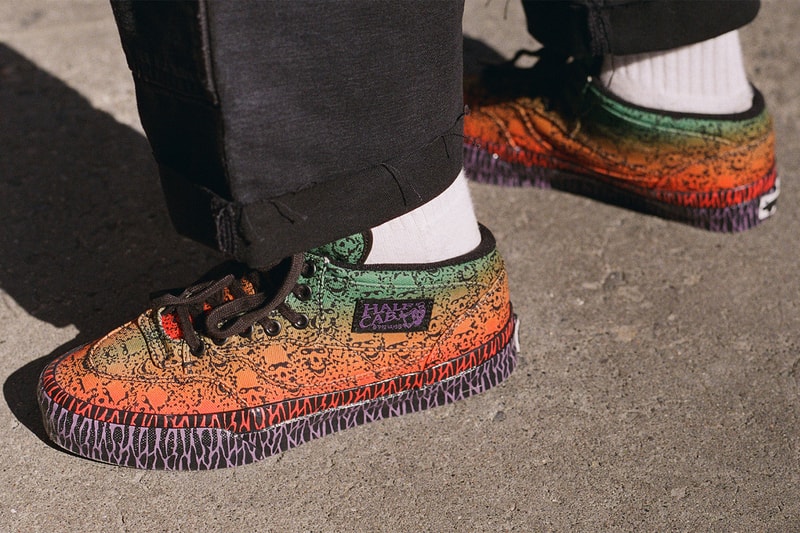
Name: OTW by Vans x Bad Idea by Chito Half Cab 33Colorway: Chito SkullSKU: VN000Z7N701MSRP: $150 USDRelease Date: October 29Where to Buy: VansOTW by Vans links with Bad Idea by CHITO for a vivid reinterpretation of the Half Cab 33, turning the skate icon into a canvas for Seoul-based artist Wreckpack.Offered in a single “Chito Skull” colorway, the sneaker is covered in Wreckpack’s distinctive airbrushed artwork, with the palette moving from muted green around the collar into sandy ochre, vivid orange and red across the forefoot. Dense black linework runs across the upper like hand-drawn tattoo or graffiti markings, while purple-and-black graphics wrap the foxing for an additional hit of contrast.Black laces and hardware temper the brighter colors, with custom tongue and Half Cab branding completing the deliberately raw, hand-worked appearance. Beneath the graphic-emblazoned upper, the Half Cab 33 receives a material update that improves its durability and comfort, along with a supportive padded collar and Sola Foam ADC All-Day Comfort insole for softer cushioning underfoot.The sneaker forms part of Bad Idea’s broader artist-driven approach: CHITO worked with Wreckpack on the footwear while Los Angeles artist Liter carries the collection into apparel, including a graphic tee and washed-black sweatshirt detailed with tonal triangular appliqués and hand-stitched X accents. View this post on Instagram
Name: HAVEN x Timberland Field BootColorway: BlackSKU: TBCMSRP: $230 USDRelease Date: October 30Where to Buy: HAVEN, HAVEN retail stores, Timberland, select Timberland storesHAVEN and Timberland have teamed up on a new take on the Timberland Field Boot, dressing the classic hiker in a single-tone hairy suede upper inspired by the dark volcanic slopes of Black Tusk. The collaboration keeps the Field Boot’s rugged bones intact while layering in technical upgrades and a more restrained, tonal finish.The upper is where the collaboration makes its clearest statement. Rather than the contrast panels and mixed materials of many Field Boot iterations, HAVEN wraps the entire shaft in one shade of hairy suede, letting the nap of the material carry the visual interest. The brushed texture gives the boot a weathered depth that ties directly back to the rock faces of Black Tusk, and the monochrome approach pushes the hiker toward a quieter, more refined look without stripping away its utility.The technical package matches that intent. A GORE-TEX lining guards against wet conditions, while PrimaLoft insulation adds warmth for colder days. A reinforced toe cap shores up the front of the boot against scuffs and impacts, and a Vibram sole anchors the build with long-wearing durability. Together, the components make the pair just as capable on a muddy switchback as on a city sidewalk.The landscape behind the design gives the boot its identity. Black Tusk is one of the most recognizable peaks in the Coast Mountains, a jagged volcanic spire that juts out of a web of glacial valleys and is visible from long distances. As weather rolls across the terrain, alpine meadows, glaciers and vivid blue lakes come into view below the dark rock, and that contrast between soft surroundings and harsh stone is what the suede is meant to evoke.To shoot the campaign, the HAVEN team traveled to Black Tusk itself, photographing the boot across sweeping viewpoints and dusty trails cut through broken volcanic rock. The brand describes the tough ascents and surreal setting as offering moments of calm and perspective, which fed back into the sense of purpose behind the project. It is a fitting backdrop for HAVEN, which is based in Vancouver, a short drive from the peak.
Many people left in Oleshky, where bombardment is constant, have run out of food. A truce set to begin early Tuesday is supposed to allow aid in and civilians out.
The Computer Emergency Response Team of Ukraine (CERT-UA) has issued an alert warning of unauthorized remote access to video surveillance systems manufactured by Dahua.
"Cases of compromising IP cameras and DVRs with access to the video stream, changing the device configuration and creating third-party accounts have been recorded," the State Special Communications Service of Ukraine (SSSCIP)
Kane was followed in the voting by Kylian Mbappé. Spain star Alexia Putellas won her third women's Ballon d'Or. Outside, fans packed the streets and climbed light poles near the London Palladium.
The Chesapeake Bay, home to blue crabs and striped bass, has a new apex predator: the blue catfish. It's invasive and voracious. It's also delicious, which officials hope might help save the bay.
In his fourth game, Warriors rookie Yaxel Lendeborg put up 31 points, 12 rebounds and 6 assists in a blowout road win over the Nuggets on Monday night.
Sean Bowe’s proposal would send the committee’s 8% share of newly created ZEC to a reserve for future miners. The committee would keep the money it has already received.
The Swiss pharmaceutical giant operates one of the last penicillin plants in Europe—losing it would raise new security and sovereignty challenges, says CEO Richard Saynor.
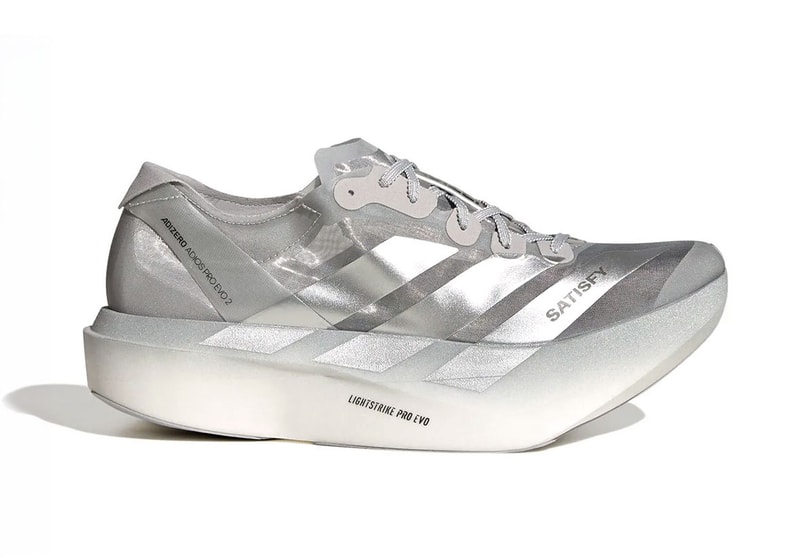
Satisfy Running and adidas have partnered on the elite Adizero Adios Pro Evo 2 racing shoeEngineered strictly for serious distance athletes the silhouette features an ultralight construction built for pure speed and efficiencyCarrying a $600 USD retail price the limited racing sneaker launches October 30 via adidas
Name: Satisfy x adidas Adios Pro Evo 2Colorway: SilverSKU: KH6636MSRP: $600 USDRelease Date: October 30, 2026Where to Buy: adidasadidas and Satisfy Running have officially unveiled the collaborative Satisfy x adidas Adizero Adios Pro Evo 2, bringing the independent label's distinct design perspective to the Three Stripes' pinnacle road-racing silhouette. The model commands a $600 USD price tag, positioning it among the most expensive performance shoes on the retail market.Satisfy has built its core reputation around high-end running apparel that unites technical performance with a directional fashion sensibility, earning a dedicated following among serious milers. In this latest joint venture, the brand applies its focused design approach to an elite racing platform engineered specifically for competitive athletes chasing marathon medals.Distancing itself from daily casual wear or relaxed jogging, the Adios Pro Evo 2 prioritizes pure speed and running efficiency through a specialized, ultralight construction. The sneaker's premium $600 USD price tag places it firmly at the intersection of elite running technology and high-end sneaker collecting, catering to runners putting in road work as well as enthusiasts seeking a rare artifact of modern running culture.The Satisfy x adidas Adizero Adios Pro Evo 2 is scheduled to release on October 30, 2026, for $600 USD via adidas.
A localized ceasefire between Ukraine and Russia took effect early Tuesday ahead of a humanitarian mission brokered by U.S. first lady Melania Trump, as missile attacks resumed in Kyiv.
The NFL, Apple Music and Roc Nation announced Monday night that Jay-Z will be the featured performer for the halftime festivities on Feb. 14 at SoFi Stadium in Inglewood, California.
The Milwaukee Brewers are one victory from their first World Series title after routing the Tampa Bay Rays 10-1 on Monday night thanks to a trio of young players who have shined in October.
President Trump campaigned Monday in Mississippi, as he continued a closing midterm rally blitz that has highlighted Republicans' challenges ahead of an election that could drastically shift power in Washington.
The U.S. Cybersecurity and Infrastructure Security Agency (CISA) on Monday confirmed active exploitation of the recently patched PHP2Shell flaws by adding them to its Known Exploited Vulnerabilities (KEV) catalog.
The PHP vulnerabilities, both rated 9.2 on the CVSS scoring system, facilitate unauthenticated remote code execution on affected deployments -
CVE-2026-109618 - An out-of-memory
The Pharrell x adidas Adistar Jellyfish 'Crystal Sand' blends earthy brown mesh, sculpted overlays, and luxury-inspired design. Here's where to buy the $300 sneaker and how resale prices compare.
Dak Prescott threw three touchdown passes, and the Cowboys avreted a three-game losing streak to keep pace in the NFC East with a 38-21 win over the Eagles.
Eagles running back Saquon Barkley said his "hamstring came out great" and doesn't believe his back issue will keep him out after a gutsy and highly efficient performance in a loss to the Cowboys on Monday night.
IHG has launched a new up to 30% off Destinations Deals sale for stays between October 30 and December 13, 2026. The sale is valid for stays in select countries in Europe and China, and in select US markets, and is available for bookings until […]
Vance and Yvonne Bradford's newborn son is named for the popular chant that filled the streets of New York after the Knicks' first title in over 50 years.
 Temp 50°
Dew 47°
Humid 88%
Rain 0%Mostly clear
Temp 50°
Dew 47°
Humid 88%
Rain 0%Mostly clear